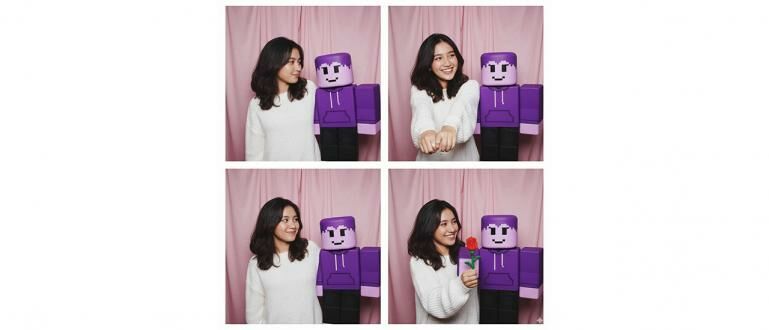
koransakti.co.id – Tren AI di media sosial kembali diramaikan oleh para pemain game, khususnya Roblox. Saat ini, sedang viral tren membuat foto strip ala photobox yang menampilkan foto diri bersama dengan avatar Roblox kesayangan. Hasilnya yang terlihat nyata seolah-olah Anda dan avatar Anda benar-benar berfoto bersama.
Kunci untuk mengikuti tren seru ini terletak pada penggunaan Google Gemini dengan perintah atau prompt yang tepat. Berikut adalah panduan lengkap cara membuatnya, lengkap dengan contoh prompt yang bisa langsung Anda salin.
Cara Membuat Foto Photobox dengan Avatar Roblox
Prosesnya sangat mudah dan hanya membutuhkan beberapa langkah sederhana.
- Siapkan Gambar: Anda memerlukan dua gambar, yaitu satu foto selfie diri Anda dengan wajah yang jelas, dan satu screenshot avatar Roblox Anda dari tampilan depan.
- Buka Gemini AI: Kunjungi situs resmi Google Gemini di gemini.google.com/app.
- Unggah Kedua Gambar: Klik ikon unggah gambar, lalu pilih foto selfie dan screenshot avatar Anda secara bersamaan.
- Masukkan Prompt Perintah: Setelah gambar terunggah, tuliskan prompt atau perintah di kolom teks untuk memberi instruksi kepada AI.
- Kirim dan Tunggu Hasil: Klik tombol kirim dan tunggu beberapa saat hingga Gemini menghasilkan foto strip ala photobox Anda.
Prompt Viral yang Bisa Anda Coba
Ini adalah prompt dasar yang menjadi kunci dari tren ini. Anda bisa langsung menyalinnya atau memodifikasi sesuai keinginan.
- Prompt Dasar: Create a 4-panel photobooth-style photo strip featuring the person from the first image and the Roblox avatar from the second image. The style should be fun and candid, as if they are friends taking pictures together inside a Korean-style photobooth with a plain blue curtain background. Do not change the face of the person or the appearance of the Roblox avatar. In each panel, show a different fun pose: Panel 1: Both are waving at the camera. Panel 2: They are making a heart sign together with their hands. Panel 3: The person is playfully poking the avatar’s cheek. Panel 4: They are both giving a peace sign.
Kumpulan Prompt Kreatif Lainnya
Ingin hasil yang lebih unik? Coba beberapa variasi prompt kreatif di bawah ini.
- Prompt Gaya “Bestie” Kocak: Create a 4-panel photobooth-style photo strip featuring the person from the first image and the Roblox avatar from the second image. The style should be fun and candid, like best friends goofing around inside a photobooth with a bright yellow curtain background. Do not change the face of the person or the appearance of the Roblox avatar. In each panel, show a different funny pose: Panel 1: Both are making a shocked face with hands on cheeks. Panel 2: The person is pretending to whisper a secret into the avatar’s ear. Panel 3: The avatar has its arm casually around the person’s shoulder. Panel 4: Both are laughing out loud.
- Prompt Gaya Gamer Kompetitif: Create a 4-panel photobooth-style photo strip featuring the person from the first image and the Roblox avatar from the second image. The style should be cool and competitive, like two pro gamers posing. The background should be a dark curtain with neon blue lighting. Do not change the face of the person or the appearance of the Roblox avatar. In each panel, show a different confident pose: Panel 1: Both are holding game controllers with serious, focused expressions. Panel 2: The person is flexing their bicep, and the avatar is giving a thumbs-up. Panel 3: Both are pointing confidently at the camera. Panel 4: They are giving each other a high-five.
Tips dan Pertanyaan Umum
- Bisakah menggunakan avatar dari game lain? Tentu saja! Anda bisa menggunakan screenshot avatar dari game seperti Minecraft, Genshin Impact, atau The Sims. Cukup ganti kata “Roblox avatar” pada prompt dengan nama game yang sesuai.
- Kenapa tampilan avatar sedikit berubah? Terkadang AI mencoba membuat avatar terlihat lebih “realistis”. Untuk mempertahankan gaya asli game, tambahkan kalimat seperti
keep the blocky, geometric style of the Roblox avatarpada prompt Anda.
Selamat mencoba dan pamerkan hasil kreatif Anda bersama avatar kesayangan!